My Keynote talk full YouTube Video – https://youtu.be/ISDRmqtFzK0
Key Presentation Takeaways + AI B2B sales trends for 2026+
This article is built from a keynote I gave in May 2026 at Pardavimų formulė, to a room of +1,500 sales professionals. It is the practical version of that talk: the same examples, tools, prompts, and numbers, written down so you can act on them. The short version:
-
- The real bottleneck is time. Salesforce data shows the average B2B rep spends only 28 percent of the week selling: 10.4 percent in person with customers, 9.4 percent virtually, and 8.7 percent prospecting. The other 72 percent goes to research, prep, quotes, manual data entry, internal meetings, and downtime.
-
- A chatbot on its own has a low ceiling. The leverage starts when you connect a frontier model (ChatGPT or Claude) to your inbox (Gmail, Outlook) and your CRM (Pipedrive, HubSpot, Salesforce, Attio). One prompt I ran live: ask the model to pull your highest lifetime-value accounts from the CRM, infer your top 3 to 5 ICP categories, and then name specific companies to target with domain, revenue estimate, and headcount.
-
- Specialized tools pull data at a scale no chatbot can. Live demos from the talk: “Find every manufacturer in Lithuania, output up to 5,000 websites” through Discolike, and a free Chrome extension (Instant Data Scraper) pulling thousands of cvbankas.lt job ads (the board listed 9,449 open roles) into a Google Sheet in minutes.
-
- Enrichment turns a raw list into outreach-ready data. The exact Clay workflow I showed: job posts, then clean company names, then deduplicate, then AI finds the website, then the decision-maker, then a verified work email, then an analysis of the role and company, then push to CRM. Thousands of data points in minutes, at roughly one cent per action.
-
- Buying signals are now public and cheap. Job ads (CV Bankas, Indeed, LinkedIn), the company registry (Rekvizitai), LinkedIn (companies, people, posts, followers), Google (Maps, Search, reviews), websites (contacts, content, tech stack), event exhibitor lists, and employee turnover.
-
- The outbound model has flipped. 2016: Google a website, call, send an email, update the spreadsheet, around 20 meetings a month. 2026: 5 AI tools automate prospecting and signal detection, reach 10x more contacts, parallel dialers run in the background, and the CRM updates itself, around 100 meetings a month.
-
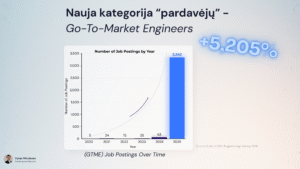
- A new role is exploding: the Go-to-Market Engineer. GTME job postings grew from 5 in 2020 to 3,342 in 2025, a rise of 5,205 percent.
-
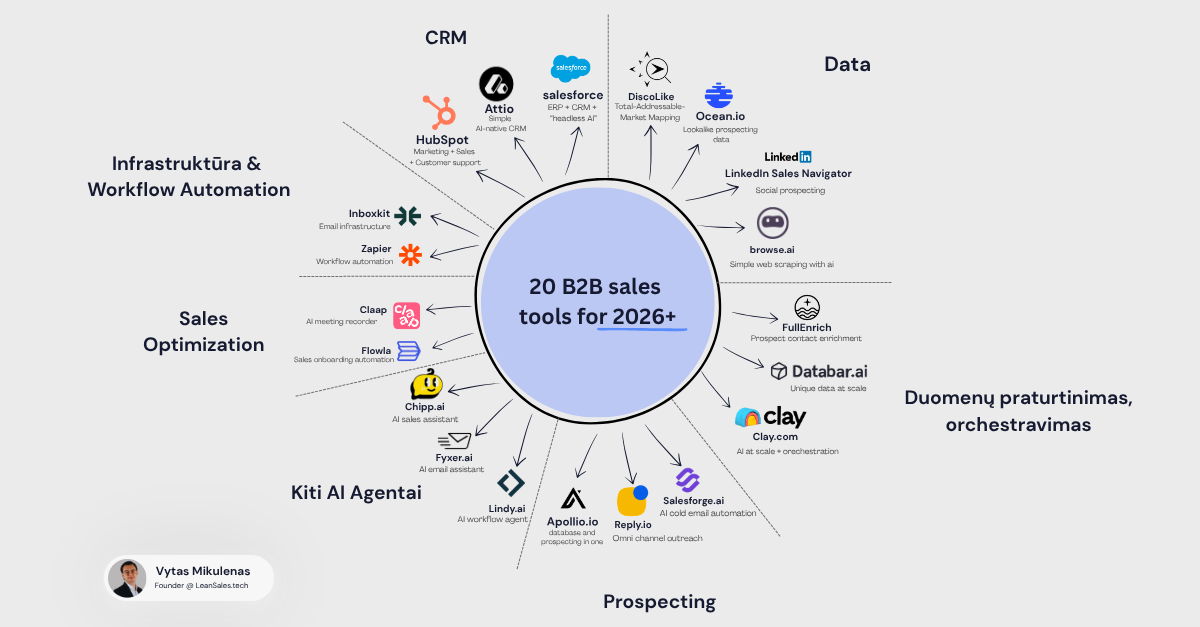
- The 2026 stack spans seven categories: CRM (Attio, HubSpot, Salesforce), data (Discolike, Ocean.io, LinkedIn Sales Navigator, browse.ai), enrichment and orchestration (Clay, FullEnrich, Databar), prospecting (Apollo, Reply.io, Salesforge), AI agents (Lindy, Fyxer, Chipp), optimization (Claap, Flowla), and infrastructure (Inboxkit, Zapier).
-
- Two golden rules. Automate it if it repeats: a subscription can usually solve a repetitive task. Do not automate trust: meetings, negotiations, and complex deals stay human.
-
- The honest caveat. If anyone can buy the same AI agent for 50 to 500 euros, it is not a competitive advantage. The Baltics still lag the US on adoption. The edge belongs to teams that build and refine their own system.
Key problem with AI in B2B is where your time goes.
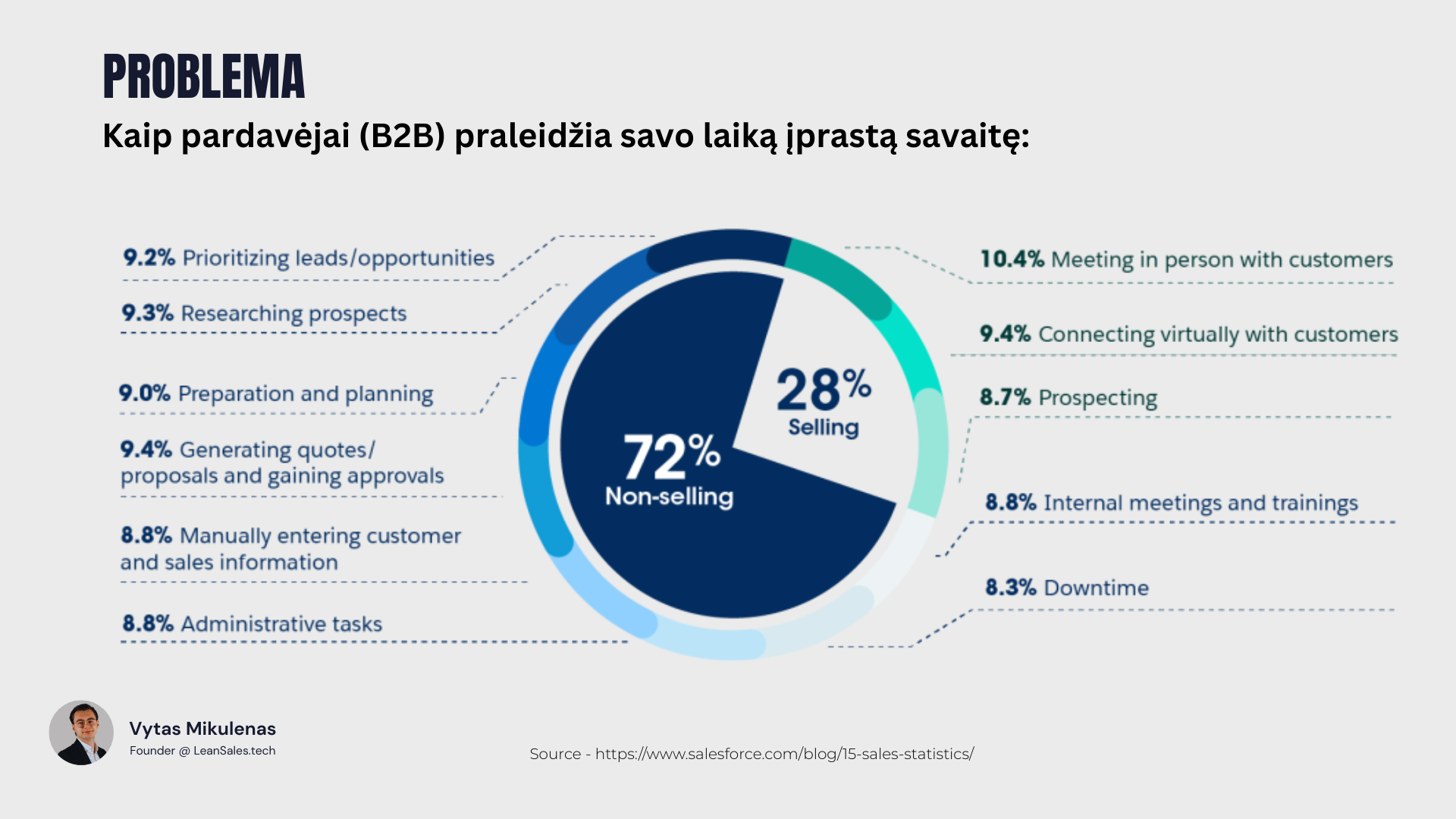
I did not open the keynote with AI, because the problem comes before the solution. That’s why I opened it with a pie chart.
Most B2B sales teams are not slow because their people are weak. They are slow because the work around selling has quietly eaten the calendar. Salesforce’s research puts hard numbers on it: the average B2B rep spends only about 28 percent of the week actually selling, on a 40-hour week that is roughly 11 hours in front of buyers. The other 29 hours produce no direct revenue.
Here is the full breakdown from that data, which is worth sitting with:
The 28 percent that is selling:
-
- 10.4 percent meeting in person with customers
-
- 9.4 percent connecting virtually with customers
-
- 8.7 percent prospecting
The 72 percent that is not:
-
- 9.4 percent generating quotes, proposals, and gaining approvals
-
- 9.3 percent researching prospects
-
- 9.2 percent prioritizing leads and opportunities
-
- 9.0 percent preparation and planning
-
- 8.8 percent manually entering customer and sales information
-
- 8.8 percent administrative tasks
-
- 8.8 percent internal meetings and trainings
-
- 8.3 percent downtime
(Source: salesforce.com/blog/15-sales-statistics)
This is the business problem hiding behind every “should we use AI” conversation. Rarely it is a technology question, I would say it is more a time-allocation question, when slow systems do not just waste hours, but additionally, they cost organizations hundreds of thousands of euros a year, in salary spent on busy work and in piepline that never gets built.
So the right question is not “how do we use AI.” It is: “Which work is stealing selling time, and which parts of it can a machine do as well or better?”
Thousands of new sales technologies (and why that is overwhelming)
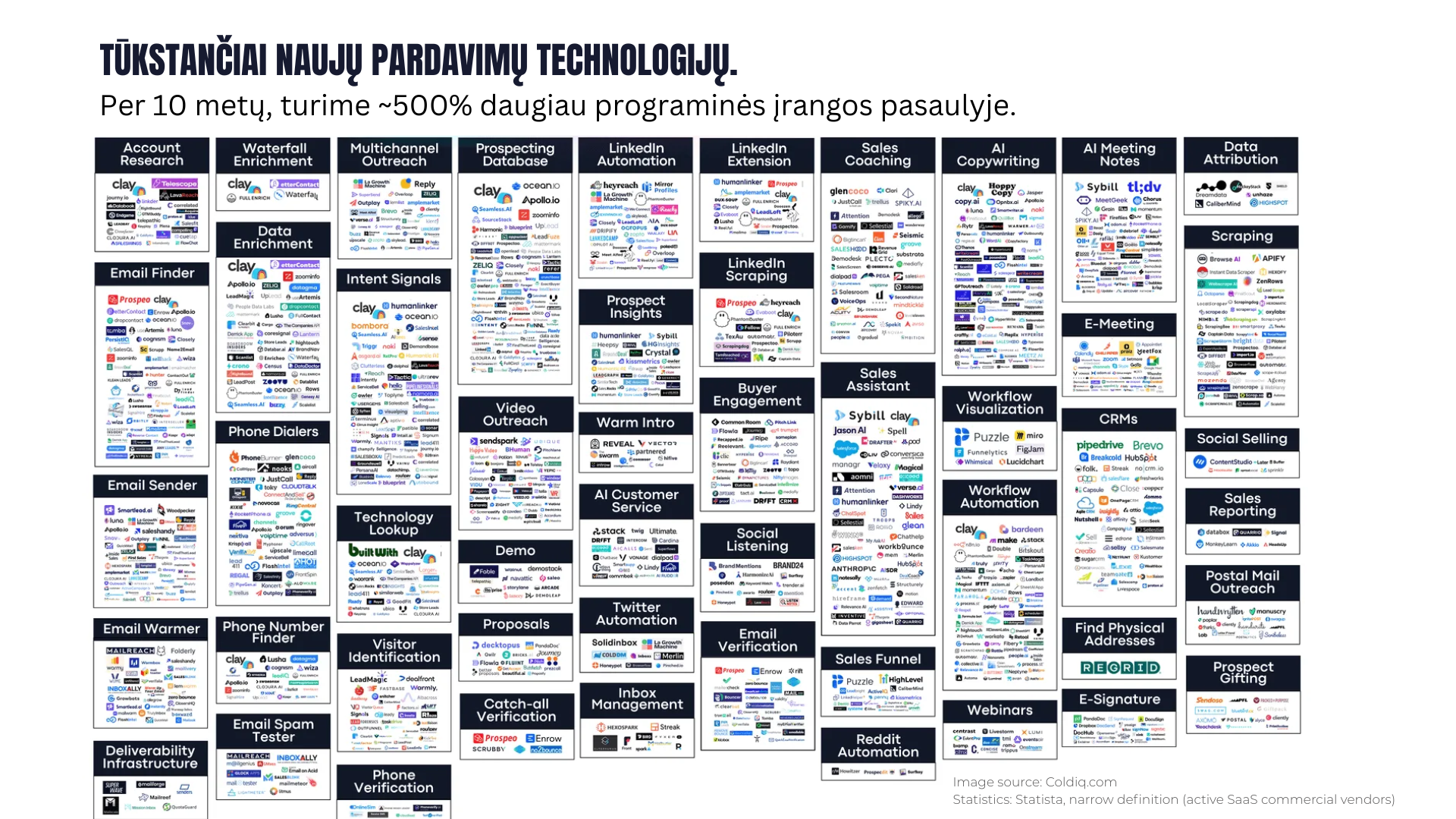
Before the solutions, one piece of context. The reason this is even possible now is that the tooling has exploded. Over the past decade, the number of active commercial SaaS vendors has grown by roughly 500 percent (Statista, narrow definition). The sales-tech landscape alone now spans dozens of distinct categories: account research, waterfall enrichment, data enrichment, email finders, phone dialers, deliverability infrastructure, intent signals, multichannel outreach, LinkedIn automation, prospecting databases, AI copywriting, AI meeting notes, scraping, and more.
That abundance is the point and the trap. There is a tool for almost every repetitive task, meaning that there are also far too many to evaluate, which is why most teams freeze, default to a chatbot, and stop there.
Why a chatbot is not a sales system
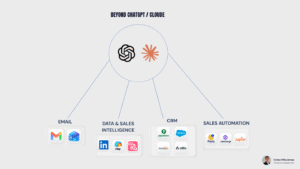
When most teams think about AI for sales, they picture one thing: a chat window. They open ChatGPT or Claude, type a prompt, and try to write a slightly better email.
That is a reasonable start. It is also a ceiling.
But most teams stop exactly here. They test a chatbot, get a few generic email drafts, and assume they have “implemented AI.”… But a chat window does not create pipeline. What really creates create pipeline is connected system.
A standalone chatbot has two hard limits: a finite memory of your context, and it can only act on what you copy in and out by hand. Ask it to “find manufacturing companies in my country” and it might hand you 50 names from memory, half of them stale.
The shift happens when you stop treating AI as a place to type and start treating it as a layer connected to your real systems. The same model becomes far more useful the moment it can read your inbox, query your CRM, and pull live data. The prompt barely changes, while the access changes everything.
Two examples I ran live on stage:
Connected to your inbox (Gmail or Outlook). Ask it to review the last week of messages, group them by who wrote and why, flag the live prospects and deals, and draft first-pass replies. No clever prompt, just access plus a clear instruction.
Connected to your CRM (Pipedrive, HubSpot, Salesforce, or Attio). This was the exact prompt on screen, lightly cleaned:
“In my CRM, from my Customer Success list, find my most successful clients by lifetime revenue value. Analyze them to determine which industries and niches are most likely to be my next ideal customers. Output a table with my top 3 to 5 ICP categories. Then, for each category, name specific companies we should target next in the Baltic countries, with company name, domain, a brief description, revenue estimate, and employee size.”
A few minutes later the model returns your real ICP, drawn from your own win history, plus a named target list. That is not a generic guess. It is your data, read back to you as a plan.
Modern AI B2B sales stack for 2026+
It helps to stop thinking in tools and start thinking in layers. Almost every useful sales automation falls into one of five. Meanwhile, this is the mental map I use when auditing or building a system.
| Layer | What it does | Example tools | Example output |
|---|---|---|---|
| 1. Data | Find companies and people that match your ICP | Discolike, Ocean.io, LinkedIn Sales Navigator, browse.ai | A list of up to 5,000 manufacturers in one market, with sites |
| 2. Enrichment | Clean, dedupe, and add detail (decision-maker, verified email, what they do) | Clay, FullEnrich, Databar | Every row has a name, role, verified email, and a one-line company summary |
| 3. Orchestration | Run many steps automatically, in sequence, at scale | Clay, Zapier | “For every row, find the site, then the CEO, then verify the email” |
| 4. Engagement | Reach the prospect across email, LinkedIn, and calls | Reply.io, Salesforge, Apollo | A multi-step campaign that sends, waits, and follows up on its own |
| 5. Optimization | Measure, transcribe, and improve | Claap, sales reporting tools | Clean campaign stats and call notes you can act on |
You do not need all five on day one, you only need to know which layer is your current bottleneck, and fix that one first.
The difficult part is knowing which layer is actually limiting your sales output. Most companies do not need a bigger stack, they need the right stack configured around their current bottleneck.
If you are not sure whether your bottleneck is data, enrichment, outreach, CRM, or reporting, that is a useful reason to contact us. We help B2B teams identify the weak layer and configure the system around it.
What AI sales automation actually looks like
This is where it gets concrete… These are moves a non-technical commercial team can run today.
Pull structured data from the web in minutes
Anyone who has built a prospect list by hand knows the pain: open a job board or registry, copy a name, paste it, find the website, paste it, repeat for days.
In the demo I used Instant Data Scraper, a free Chrome extension, on cvbankas.lt, the largest Lithuanian job board, which at the time listed 9,449 open roles. You point it at a structured results page, confirm the pattern, show it the “next page” button, and it walks every page, pulling company name, role title, location, and the job URL into a Google Sheet. Work that used to define an entry-level role gets done roughly 50 times faster.
A note on doing this responsibly, because it matters in the EU: respect each source’s terms, and treat personal data under GDPR with care. Good data sourcing is not about grabbing everything. It is about collecting the right, lawful signals.
Enrich and qualify automatically
A raw list is not a prospect list. But enrichment is the step that turns rows into something a rep can act on. The tool I demoed was Clay, and the workflow ran in this exact order:
-
- Import the job posts
-
- Clean the company names
-
- Deduplicate
-
- AI finds the company website
-
- AI finds the decision-maker (or the director, if no one more specific exists)
-
- Find and verify that person’s work email
-
- Analyze the role and the company (including a simple B2B or B2C tag)
-
- Push the result to the CRM
The AI visits each company’s live website in real time and writes the answer back into a column, at scale this costs on the order of a cent per action, and you can run 150 rows or 50,000 with no extra technical work. The list comes out the other side ready for outreach. Thousands of data points in minutes.
Read the signals other teams ignore
The reason all of this matters is that buying signals are now public and cheap. These are the sources most commonly scraped for active sales:
-
- Job ads (CV Bankas, Indeed, LinkedIn): a company hiring a sales rep is telling you something
-
- The company registry (Rekvizitai in Lithuania, the local equivalent elsewhere)
-
- LinkedIn: companies, people, posts, followers
-
- Google: Maps, Search, and reviews
-
- Websites: contacts, content, and the technology they run
-
- Event exhibitor and attendee lists
-
- Employee turnover
A job ad is a signal. A new office, a funding round, a leadership change, a specific tool on the website: all signals you can collect in near real time and use to time your outreach. The teams that win are not sending more email, they are reaching the right account at the right moment with a relevant reason.
The outbound model has flipped: 2016 vs 2026
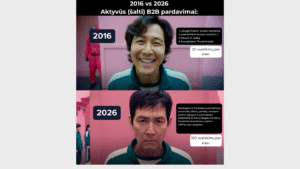
Here is the shift in one comparison.
In 2016, cold B2B outbound looked like this: Google to find a website, call the number you found, send an email, then update the Excel sheet. A good month was around 20 meetings.
In 2026 it looks like this: 5 AI tools automate prospecting and buying-signal detection, you reach roughly 10x more contacts, parallel dialers run calls in the background, and the CRM updates itself. A good month is closer to 100 meetings.
Same effort, but extremely different output. The difference is not working harder. It is removing the manual steps between intent and contact. But this does not happen by adding one AI tool on top of an old process. If the CRM is messy, the data is weak, and the messaging is generic, automation only scales the mess faster.
This is why we usually start by mapping the current outbound process first: where leads come from, how they are enriched, how messages are created, and where the CRM breaks. If that is unclear in your team, it is worth speaking with us before buying another tool.
The new role: the Go-to-Market Engineer
Ten years ago, the “list builder” was an entry-level job. Today it is becoming an engineering discipline.
A new kind of operator has emerged: the Go-to-Market Engineer (GTME). This is the person who designs the data collection, the enrichment workflows, the automated messaging, and the reporting, so the rest of the team can spend their hours selling. They are not traditional coders. They know the sales process well enough to know what to automate and which tools to connect.
The demand curve is steep. GTME job postings went from 5 in 2020 to 3,342 in 2025, a rise of more than 5,000 percent.
Chart titled “Go-To-Market Engineers” showing GTME job postings by year: 5 in 2020, 24 in 2021, 15 in 2022, 25 in 2023, 63 in 2024, and 3,342 in 2025, a 5,205 percent increase. Source: State of GTM Engineering Survey 2026.
Go-to-Market Engineer job postings over time. Source: State of GTM Engineering Survey 2026.
This is the most concrete team and career shift in B2B sales right now. The manual “researcher” role is fading. The “engineer who multiplies a sales team” role is growing fast.
The 2026 B2B sales tool stack
The full landscape is overwhelming, so here is the shortlist I shared: 20 tools across seven categories. You will not use all of them. Pick the layer that is your bottleneck and start there.
Diagram titled “20 B2B sales tools for 2026+” arranged in a wheel across seven categories: CRM (Attio, HubSpot, Salesforce), Data (Discolike, Ocean.io, LinkedIn Sales Navigator, browse.ai), enrichment and orchestration (Clay.com, FullEnrich, Databar.ai), Prospecting (Apollo.io, Reply.io, Salesforge.ai), other AI agents (Lindy.ai, Fyxer.ai, Chipp.ai), Sales Optimization (Claap, Flowla), and Infrastructure and Workflow Automation (Inboxkit, Zapier).
A practical 2026 starting stack, grouped by job to be done.
In words, grouped by the job they do:
-
- CRM: Attio (simple, AI-native), HubSpot (marketing, sales, and support), Salesforce (ERP plus CRM plus “headless AI”)
-
- Data: Discolike (total addressable market mapping), Ocean.io (lookalike prospecting data), LinkedIn Sales Navigator (social prospecting), browse.ai (simple web scraping with AI)
-
- Enrichment and orchestration: Clay.com (AI at scale plus orchestration), FullEnrich (prospect contact enrichment), Databar.ai (unique data at scale)
-
- Prospecting: Apollo.io (database and prospecting in one), Reply.io (omni-channel outreach), Salesforge.ai (AI cold email automation)
-
- Other AI agents: Lindy.ai (AI workflow agent), Fyxer.ai (AI email assistant), Chipp.ai (AI sales assistant)
-
- Sales optimization: Claap (AI meeting recorder), Flowla (sales onboarding automation)
-
- Infrastructure and workflow automation: Inboxkit (email infrastructure), Zapier (workflow automation)
What we see in real client projects

I run leansales.tech, where we build AI-driven outbound abd inbound sales systems for European B2B companies, often in manufacturing, logistics, SaaS, and B2B services. A few patterns show up almost every time.
First, the bottleneck is rarely the messaging. It is more about the data and the process feeding it, teams obsess over the perfect email while their reps lose two days a week to research and admin. I suggest Fixing the time leak first.
Second, the biggest early wins come from connecting tools the company already owns. The CRM, the inbox, and one good data source, wired together, beat any single shiny tool.
Third, the teams that get the most value treat AI like a junior operator that needs clear instructions and review, not a magic button. They automate one repetitive task, check the output, and only then scale it.
And the honest part: not everything we test works. Some enrichment comes back wrong. Some segments do not respond. The value is in running the loop quickly and cheaply enough that the misses do not hurt. I did not rehearse the keynote in front of a mirror or memorize lines. I came with one goal: to show, with real screens and real numbers, how a team gets more meetings faster. That is the same standard we hold the work to.
Common myths and mistakes
Myth: AI will replace B2B salespeople. In complex, high-trust, multi-stakeholder deals, it will not. The selling stays human. The busy work goes to the machine.
Myth: a better prompt is the breakthrough. Prompts matter, but the leverage is access and orchestration, not wording. A plain prompt connected to your CRM beats a brilliant prompt connected to nothing.
Myth: more tools mean more sales. There are dozens of categories and thousands of products. Adding a twelfth tool rarely helps. Connecting the ones you already have usually does.
Mistake: automating the relationship. Automating discovery, negotiation, or trust-building is the fastest way to damage a pipeline. Those are the parts that justify your margin.
Mistake: buying an agent and calling it a strategy. If anyone can buy the same off-the-shelf AI agent for 50 or 500 euros, it is not an advantage. It is table stakes.
The AI will pull leads from the same sources as everyone else. It will write robotic messages based on overused practices. The emails will often land in spam, or worse, they will reach the right people with the wrong reason. A competitive system does not come out of the box.
That is why we configure competitive, custom sales systems: data sources, enrichment logic, messaging, deliverability, CRM flows, and reporting, built around the company’s actual market.
A practical playbook for B2B teams
A simple sequence, in order:
-
- Measure the time leak. For one week, have reps roughly log selling time versus research, admin, and CRM time. You will likely see the 28 percent pattern. Now you have a baseline.
-
- Pick one repetitive task. List building, lead research, inbox triage, CRM updates, or post-call notes. Choose the one that eats the most hours and needs the least judgment.
-
- Connect AI to one system you already use. Start with the inbox or the CRM. Give it access, a clear instruction, and review the first outputs by hand.
-
- Automate data and enrichment before messaging. Get clean, qualified lists flowing first. Outreach on bad data just scales the waste.
-
- Add engagement, then measurement. Layer in sequencing once the data is reliable. Add reporting and call transcription so you can see what works.
-
- Review, then scale. Only widen an automation after you have checked its output on a small batch. Keep a human in the loop on anything customer-facing.
-
- Protect the human moments. Decide explicitly which steps stay human: discovery, demos, negotiation, complex deals. Automate around them, not through them.
The golden rule to automate: if a task repeats, a subscription can probably solve it. The golden rule not to automate: anything that builds trust stays human.
When AI sales automation does NOT work
-
- If you purchase a cheap “AI Agent tool” that follow basic templated configuration. The AI will pull leads from same sourcesl like others. The AI will write robotic messages following over used practices. The emails will go to spam. A competitive system doesn’t come out of the box. That’s why we configure competitive, custom sales systems.
- Small, high-touch markets. If your total addressable market is a few dozen named accounts, you do not need automated prospecting. You need relationships. Build the list by hand and pick up the phone.
- If you purchase a cheap “AI Agent tool” that follow basic templated configuration. The AI will pull leads from same sourcesl like others. The AI will write robotic messages following over used practices. The emails will go to spam. A competitive system doesn’t come out of the box. That’s why we configure competitive, custom sales systems.
-
- No process to automate. AI does not create a sales process. It scales the one you have. If you’re stuck in chatGPT processesing 1 lead every ~5 minutes then you;re not much faster than a human.
-
- Strict data and privacy constraints. In the EU especially, some sourcing and outreach is limited by GDPR and platform terms. Some of what is technically possible is not lawful or advisable. Thats why its improtant to consulnt with an expert from EU.
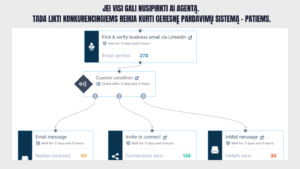
There is also a wider point on competitiveness. Tooling like Clay is already trusted by more than 300,000 GTM teams, and the leading US technology companies (the likes of OpenAI, Google, Anthropic, Notion, Perplexity, Figma, and Ramp) have adopted this way of working. The Baltics and much of the EU still lag. That gap is the opportunity, but it cuts both ways: when everyone can buy the same agent, the off-the-shelf setup stops being an edge.
The teams that stay competitive build their own system on top of the tools. A real example from the talk: a single custom sequence that finds and verifies a business email through LinkedIn (273 emails verified), then branches on a condition into three paths, an email message (40 replies received), a connection invite (128 connections sent), and an InMail (22 sent). The tools are off the shelf. The orchestration, the targeting, and the messaging are not.
FAQ
What is AI sales automation in B2B? It is the use of AI and connected software to handle the repetitive, non-selling parts of B2B sales: finding and researching companies, enriching contact data, drafting and sending outreach, updating the CRM, and reporting. The goal is to free salespeople to spend more time on conversations, not to replace them.
Why does it matter in 2026? Because B2B reps still spend only about 28 percent of their time selling, and the tooling to automate the other 72 percent is now cheap and accessible. Teams that close that gap reclaim selling capacity competitors are leaving on the table.
How does AI sales automation actually work? You connect AI to your existing systems (inbox, CRM, data sources) and to specialized tools across five layers: data, enrichment, orchestration, engagement, and optimization. The AI reads context, performs steps at scale, and writes results back into tools you already use.
What are concrete examples of AI sales automation in B2B? Pulling thousands of target companies from a job board into a sheet in minutes, enriching each row with a verified decision-maker and email through Clay, classifying what each company sells, drafting personalized first-touch emails, running a multi-step Reply.io sequence, and producing clean campaign and call reports automatically.
When should a company use it? When you have a repeatable sales process, a market large enough to justify scale, and clean enough data to build on. Start with the most repetitive, lowest-judgment task.
What is a Go-to-Market Engineer? A new sales role focused on building the data, automation, and reporting systems that make a sales team more productive. Demand for the role grew more than 5,000 percent between 2020 and 2025.
Will AI replace B2B salespeople? Not in complex, high-trust deals. It replaces the busy work around the sale, not the judgment, trust, and negotiation at the center of it.
If you are experimenting with this inside your own sales system, where to draw the line between automation and human selling is exactly the kind of problem we work on every day at leansales.tech. The teams that invest a little time now in the right tools, processes, and messaging are the ones who will stay competitive as the rest of the market fills up with the same off-the-shelf agents.
Written by Vytautas Mikulėnas, founder of leansales.tech, where we build AI-powered revenue and outbound systems for European B2B companies. Based on a 2026 keynote at Pardavimų formulė, delivered to roughly 1,500 sales professionals on the AI tools that increase B2B sales.
